

Introduction
Background
Fire Tablets had a reputation as a 'content consumption' device. In a market where AI was redefining what every screen could do, that wasn't going to be enough.
This project was the answer to that gap, starting as a short-term GenAI feature exploration with a 1–2 year timeline, then expanding into a full product vision with a 3–5 year horizon after leadership approval. I led the design strategy from early exploration through to the final vision.
Opportunity
We had strong behavioral data on how customers used their tablets for entertainment, shopping, reading, and productivity. Our strategy wasn't to invent new behaviors, but to make the ones already happening smarter.
The goal: design a GenAI feature that fits how customers already use Fire Tablets, and positions the platform as a real competitor in an AI-driven market.
Outcome
We designed a context-aware AI agent that could identify, predict, suggest, and act without pulling customers out of what they were doing. The feature was added to the Fire Tablets product roadmap, opened new revenue and customer acquisition opportunities, and changed how the organization thought about Tablets' role in Amazon's AI ecosystem.
SHAPING THE VISION
From "AI on Tablets" to a clear product direction
I led four stages of research and framing: identifying high-value use cases, brainstorming solutions, connecting ideas to what we could build, and validating through a structured decision framework.
Market Research
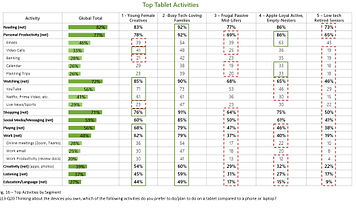

Usage data: Top Tablet activities and demographic info
I analyzed user demographics, adoption rates, and behavioral data to find where Tablets already played a significant role in customers' lives. High-usage areas pointed to both stronger user needs and stronger business opportunity.
What the data showed: entertainment, shopping, reading, and productivity were clear areas of impact.
Learning: Customers were using Tablets for tasks with productivity implications but the device wasn't designed to support that. That gap gave us our opportunity.
Brainstorming within focus areas
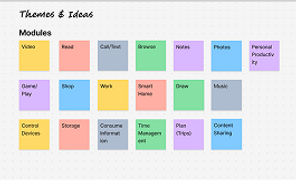

I ran brainstorming sessions grounded in a single constraint: every idea had to connect to something customers were already doing. Features like contextual summarization, visual search, conversational chat, and transcription emerged as the strongest candidates.
Learning: The most valuable ideas weren't the most novel but they were closest to what customers were already trying to do.
Connecting ideas to what we could actually build
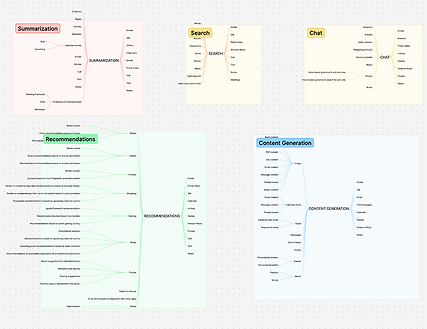
I mapped each solution against resources we already owned, had access to, or could feasibly build. This step also surfaced collaboration opportunities with adjacent teams, which was important for both feasibility and long-term scalability.
Validating
and Prioritizing
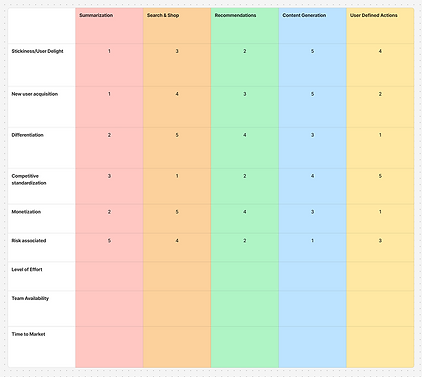
I built a decision matrix scoring each feature against feasibility, development effort, user delight, and risk. The output was clear: the highest-scoring features, contextual suggestions, visual input processing, quick actions, all shared the same underlying input model and produced the same type of output.
They weren't separate features like we thought, they were just fragments of the same feature.
The pivot: one agent, not many features
Tablets are...
Visual-forward
Voice-compatible
App-friendly
Building top features separately would fragment the customer experience with no real benefit. The matrix told us that the right architecture was one unified GenAI agent that could adapt across contexts, instead of what to build first.
Tablets are visual-forward, voice-compatible, and app-integrated. A single agent with those three capabilities at its core was the only version that could work across the full range of how customers used their devices.
BRINGING THE IDEA TO LIFE
Building the interaction model
Mapping out the concept
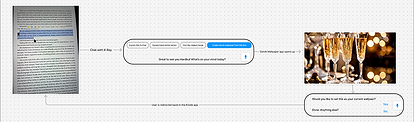
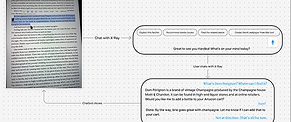

We started with rough user flows to understand how an AI agent would show up in real customer moments like watching a video, reading, shopping, etc. The core principle was to surface suggestions based on what the customer is already doing, without interrupting it.
The inspiration was FireTV's X-Ray feature that layers context onto an experience rather than pulling you out of it. We wanted to build on that model and push it further to an agent aware of current activity, location within the interface, and what actions would be useful right now.
Flow diagrams showing interaction across scenarios
What inputs does
the feature need?
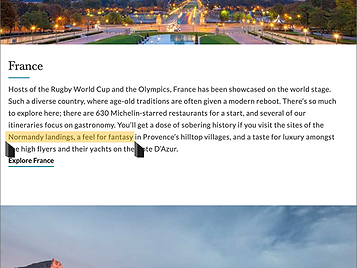
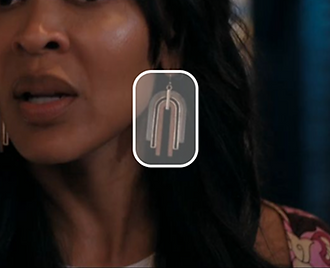
Two types of input: text and visual
I worked through target use cases to figure out what kind of input the model needed to work well. Since Tablets are entertainment and productivity-forward, our main scenarios came down to:
visual input (streaming, images, in-app content) and text input (articles, Kindle, web pages, 3P apps).
From that, two input methods: text selection (like highlighting) and image selection (tap or drag over visual content). Simple, intuitive, and broad enough to cover the majority of real scenarios without requiring customers to learn a new paradigm.
Applying the model
to real scenarios



Flow diagrams for video, reading, gaming
I built visual flows for three core use cases: gaming, shopping, reading, chosen to cover different input types and contexts. This stress-tested the model and revealed where it broke down before going further.
The agent took the form of a moveable modal, surfacing quick actions and suggestions. Our priority here was was clarity, speed, and minimal disruption.
How would customers trigger the agent?
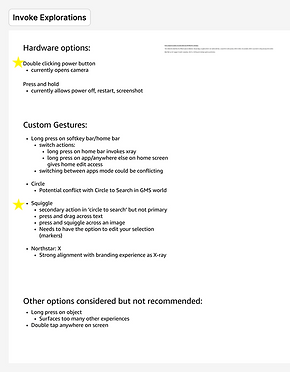
I mapped existing Fire Tablet gesture patterns first including two-finger taps, long-press, swipe, and ruled them out because they already carried established meanings. Custom gestures were the right direction to avoid changing our users' mental models.
I explored an X gesture (a nod to X-Ray on FireTV) but moved away from it. Our feature had more nuance, and tying it to FireTV's mental model would quietly limit customer expectations. I landed on a custom squiggle gesture over images and press-and-drag over text: distinct, learnable, conflict-free.
Gesture Explorations
Pushing back on the modal
The product team had aligned on a modal design but I raised a concern that we had previously missed: an opaque modal would actively block content. In error states like accidental triggers, it would cover the screen entirely, directly conflicting with the core design tenet we'd set: the agent must be unobtrusive.
Rather than flag it and move on, I brought it back as a design problem worth solving before going further. So we went back to the drawing board to brainstorm what other forms could our agent take?

Side panels, transparent modals, Z-plane layouts, etc.
I ran a broad exploration of alternate forms like side panels, translucent overlays, Z-plane layouts, and brought them to a team-wide critique before narrowing. Each form had different implications for screen real estate, error states, and scalability across content types.
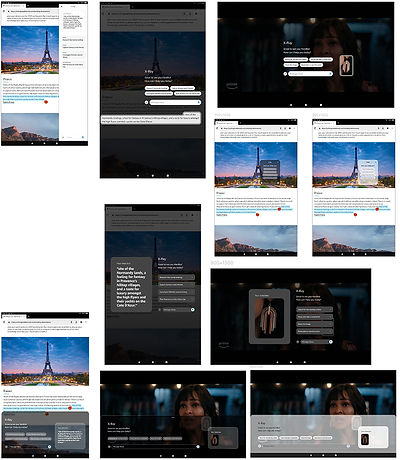
Translucency, Z-plane positioning, and selection history
Refining after feedback:
A second iteration focused on the strongest directions from the critique included translucency, Z-plane positioning, and selection history. I worked in parallel with engineering to confirm feasibility with existing voice agent patterns and GenAI engines. The goal was to be ambitious but buildable with our infrastructure.
GAINING STAKEHOLDER SUPPORT
Pitching the concept and expanding the scope
X-ray feature
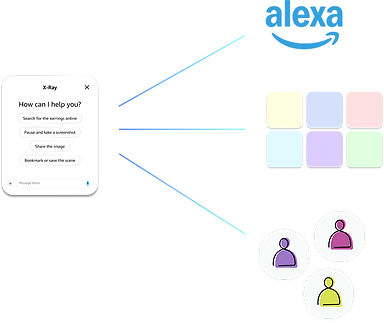
Alexa functionality and visual language
1P / 3P apps and services integration
Learned customer patterns and contexts
Scope Expansion Diagram
I led the presentation to senior leadership and the proposal was approved. The main piece of leadership feedback turned into a scope expansion: the feature would be significantly more powerful with Alexa's conversational layer, giving us multi-turn conversations, 3P integrations, learned customer patterns, and Alexa's full ecosystem. That expanded the timeline from 1–2 years to a 3–5 year vision.
The Alexa integration wasn't just a leadership suggestion but it solved a real design gap. The visual-only agent could surface suggestions but couldn't complete actions or maintain context across tasks. Alexa made that possible and transformed the agent from something that reacted to the current moment into something that could operate across the customer's full context.
Visual Remodel

With Alexa integration unlocked, I worked with the visual design team to reimagine how the agent looked and communicated. We expanded scenarios to include multi-turn conversations, contextual actions, and automation, designing toward the right north star even though near-term feasibility wasn't there yet.
Interaction Remodel

Existing gestures:
pinching
Custom gestures:
Circle, squiggle, box, X
Image detection and selection
With a longer runway, I revisited the trigger model. Hardware fixes had been an earlier constraint became possible with more resources available, which meant custom gestures were possible. I reopened explorations that had been ruled out due to resourcing and added gestures with looser constraints like circles, squiggles, boxes, X, and passive image detection.
Building the vision
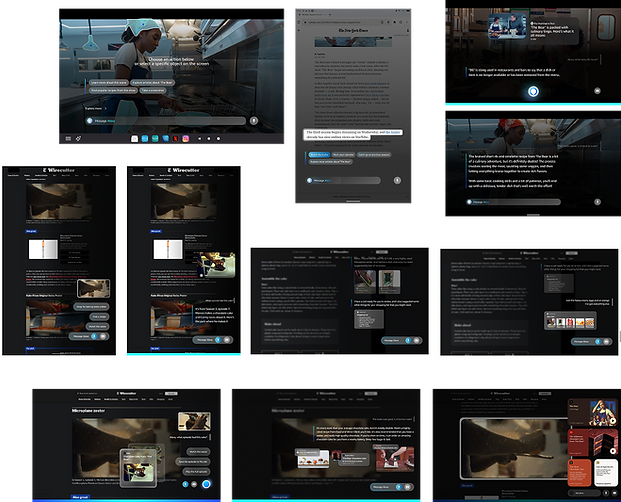
Visual style explorations
To pitch a 5-year vision that was only imaginable today, to leadership committing real roadmap resources, a static deck wasn't going to be enough. I made the call to build a vision film instead, working with visual design, art direction, and motion teams to let people feel what the product would be like, not just understand it.
A film makes the future tangible and inspired us to answer questions like "What does a new generation of Fire Tablets look like with this agent at its core? What does the brand feel like? What is the customer's relationship with their device in 3-5 years?"
FINAL SOLUTION
The Future of Alexa on Tablets
Stills from the vision film
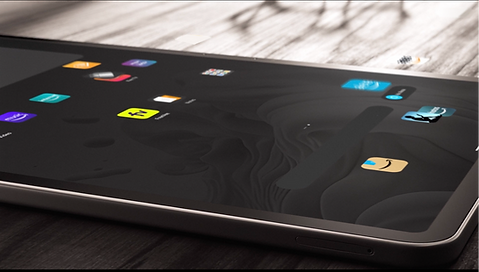
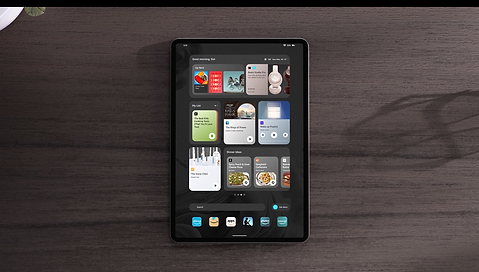
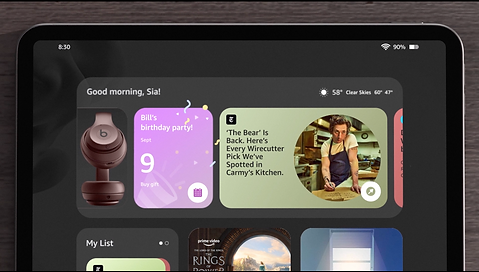
A new look for Fire Tablets
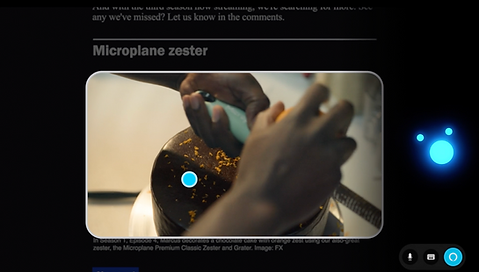
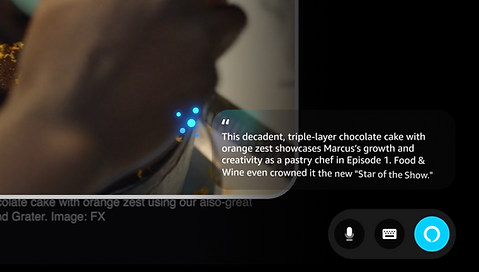
Contextual visual detection in action
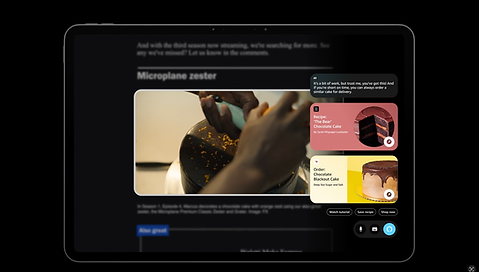
Visual-forward, action-oriented responses and suggestions
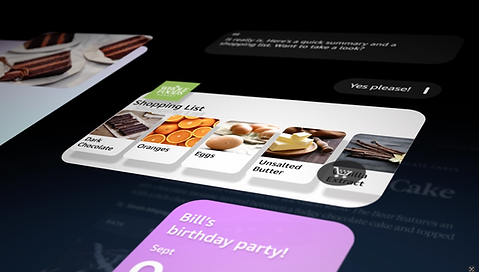
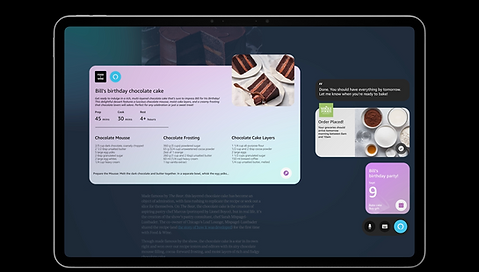
Questions transformed into actions
OUTCOME
What this project opened up
This feature was added to the Fire Tablets roadmap as the future of agent interaction. The initial version entered development. The project received recognition from senior leadership and directly influenced how Tablets were positioned in Amazon's AI strategy.
Market positioning
A credible answer to what Fire Tablets would be in an AI-driven market: not AI as a feature, but as the core of how the device works.
A new model for agent interaction
Moved past the chatbot paradigm toward something contextual, embedded, and action-oriented. That model opened new conversations about agents across Amazon devices.
New revenue workstreams
Connected the agent to Amazon's broader ecosystem, creating customer acquisition opportunities in productivity, an area Tablets had historically underserved.
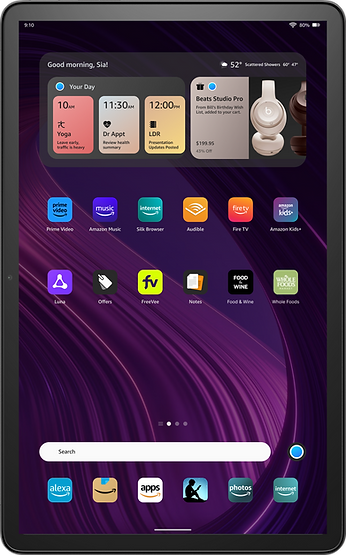
Agent on Home screen
What I learned
Commit before the path is fully clear
Long-horizon projects have a trap: waiting for enough information before deciding. At a certain scope, more research gets you stuck in analysis paralysis. This doesn't just stall progress, it also doesn't resolve ambiguity and making a decision is the only way to move forward. Learning from this, I like to incorporate explicit decision points into long-horizon work so exploration doesn't become a permanent state.
The pivot as a skill
Stepping back to reframe the problem from multiple features to one agent, from a standalone tool to an Alexa-integrated vision, required slowing down before speeding back up. Knowing when to do that is something I actively bring to projects now.
Choose the right artifact for the audience
A 5-year vision in a slide deck is an abstraction. A vision film is an experience. The film worked because it made leadership feel the product. That lesson has changed what I bring into every high-stakes presentation.